Development Board
The development board is intended for developers and advanced users. It features USB Type-C connectors and can be connected to a computer via a PCIe x4 slot
Features
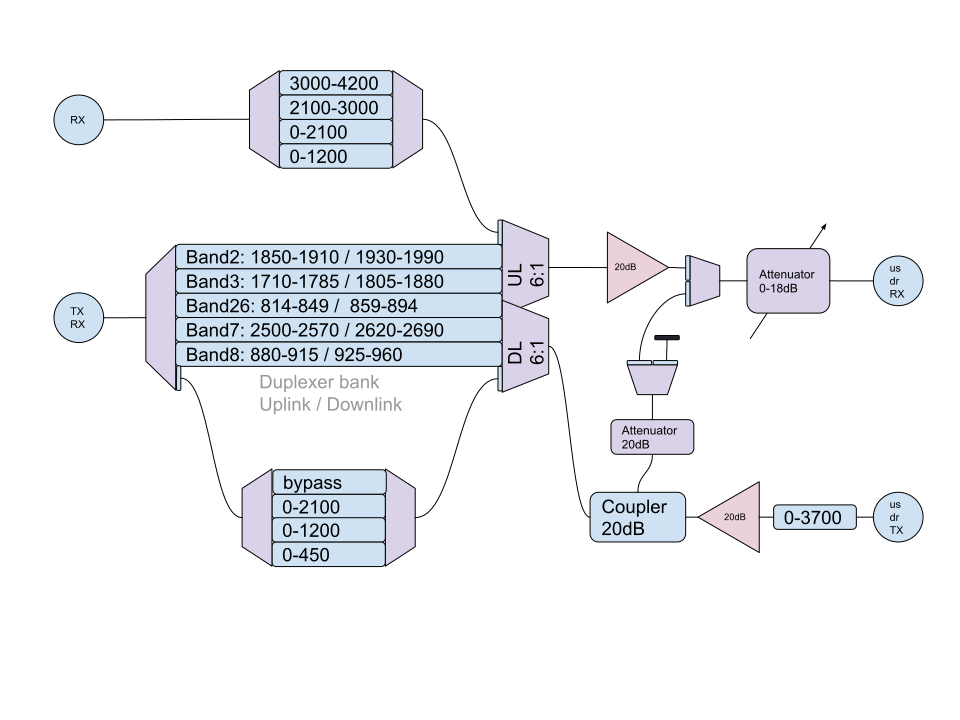
Simple Radio Frontend: Facilitates prototyping in the 2.4-GHz ISM band
Cellular Band Duplexer: Supports common cellular frequency bands.
Enhanced TRX Power
Improved RX Sensitivity
Extended Automatic Gain Control (AGC)
Precision Clock Synchronization: Synchronization via a GNSS module.
Mounting Options: Includes mounting holes for a heatsink or enclosure.

Technical Specifications
GPSDO: GNSS module + 12-bit DAC for VCTCXO
GPIO: 12 GPIOs in six banks with different voltage levels (1.8 - 5 V)
USB Type-C: 5 V, 3 A (USB 3.0 lines routed, currently without gateware support)
- RF filters:
3.0 - 3.8 GHz
2.1 - 3.0 GHz (ISM, Wi-Fi, Bluetooth, Zigbee)
0 - 2.1 GHz
0 - 1.2 GHz
- TX filters:
0 - 3.8 GHz
0 - 2.1 GHz
0 - 1.2 GHz
LNA/PGA: MiniCircuits PGA-103+
Installation
The development board comes with a factory setup after testing. To use the full potential of the board, some cable re-routing needs to be applied.
Plug in the uSDR using a thin thermal interface in between.
Gently unplug the cables from connectors J20 and J19.

Use your MHF4 - MHF4 jumpers to connect the uSDR RX/TX to J20 and J19.
The two available SMA cables can be plugged into the uSDR HF connector and the 1PPS connector (see the picture).

Apply a thicker thermal interface (2.0 mm) and the heatsink as described in the Heatsink installation chapter.
Here is the final SMA schematic on the panel.

Note
If you don’t need to use the development board, you can route SMA cables directly to the uSDR connectors in the order you want.
Reference clock
Several options are available for the reference clock source:
uSDR’s internal reference clock source: 26 MHz (default mode)
Development board reference clock:
Development Board Rev 1.0 reference clock generator runs at 25 MHz;
The dev board’s reference frequency can be slightly adjusted using the voltage-controlled oscillator settings (the
dac_option, see below);You must configure uSDR to use the reference clock from the DevBoard. For instructions, refer to the section below or usdr_dm_create utility docs.
Connection to an external clock generator.
The input frequency range should be between 23 and 41 MHz.
The peak voltage should not exceed 3.3 V.
Additional settings
Development Board includes a set of “hidden” options that allow for fine-tuning and optimization, enabling you to get the most out of your device.
The most common way to access these options is by using the -D option of the usdr_dm_create utility. The key lies in the fe (front-end) variable settings, such as:
usdr_dm_create -Dfe=<dev_board_id><dev_board_rev>:<par1>:<par2>:..:<parN>
If you prefer to work with the API, you can pass a parameter string to the usdr_dmd_create_string() function call:
pdm_dev_t dev = NULL;
int res = 0;
const char* params = "fe=pciefev1:osc_on";
/*
..
*/
res = usdr_dmd_create_string(params, &dev);
if (res)
{
    /*
    error handler
    */
}
where:
int res == 0 on success, errno otherwise;
const char* params - your parameter string (equivalent to -D option);
pdm_dev_t dev - your SDR connection handle.
The correct meaning of fe:
Dev board name -
pciefe;Dev board revision added without any separator;
Use a colon
(:)as the parameter separator;Colon-delimited parameters list.
Example of enabling the DevBoard’s reference clock oscillator:
usdr_dm_create -t -r1e6 -c-1 -Y4 -E390e6 -e390e6 -I ./signal_1khz.ci16 -C1 -o -aexternal -Dfe=pciefev1:osc_on -x26e6
The supported revisions are:
v0v0av1
Note
If the revision string is unrecognized, v1 is used.
Each option is specified in a form <name>_<suffix>, where the suffix can be:
onorento enable the option;offto disable the option;<val> - option-specific value.
The complete options list:
path_- set operation mode (see below);gps_- (on/off) GPS module;osc_- (on/off) reference clock oscillator;lna_- (on/off) RX LNA (Low Noise Amplifier), typical gain +19.5dB (see QPL9547TR7 specs for details);pa_- (on/off) TX Power Amplifier, typical gain +19.5dB (see QPL9547TR7 specs for details);dac_- adjust the voltage-controlled reference clock oscillator frequency (valid range for correction: 0..65535). The default value is 32768 (no correction);
Typical adjustment range: ~-275Hz (0)..0Hz (32768)..+275Hz (65535), i.e. ~0.008Hz per one point.
lb_- (on/off) RX->TX loopback;uart_- (on/off) UART interface;attn_- RX attenuator (0..18 corresponds to 0..-18dB).
Supported operation modes (path_):
// Duplexers path
{ "band2", TRX_BAND2, RX_LPF1200, TX_LPF400, EN_PA | EN_LNA },
{ "pcs", TRX_BAND2, RX_LPF1200, TX_LPF400, EN_PA | EN_LNA },
{ "gsm1900", TRX_BAND2, RX_LPF1200, TX_LPF400, EN_PA | EN_LNA },

{ "band3", TRX_BAND3, RX_LPF1200, TX_LPF400, EN_PA | EN_LNA },
{ "dcs", TRX_BAND3, RX_LPF1200, TX_LPF400, EN_PA | EN_LNA },
{ "gsm1800", TRX_BAND3, RX_LPF1200, TX_LPF400, EN_PA | EN_LNA },

{ "band5", TRX_BAND5, RX_LPF1200, TX_LPF400, EN_PA | EN_LNA },
{ "gsm850", TRX_BAND5, RX_LPF1200, TX_LPF400, EN_PA | EN_LNA },

{ "band7", TRX_BAND7, RX_LPF1200, TX_LPF400, EN_PA | EN_LNA },
{ "imte", TRX_BAND7, RX_LPF1200, TX_LPF400, EN_PA | EN_LNA },

{ "band8", TRX_BAND8, RX_LPF1200, TX_LPF400, EN_PA | EN_LNA },
{ "gsm900", TRX_BAND8, RX_LPF1200, TX_LPF400, EN_PA | EN_LNA },

// TX-only path
{ "txlpf400", TRX_BYPASS, RX_LPF1200, TX_LPF400, EN_PA },
{ "txlpf1200", TRX_BYPASS, RX_LPF1200, TX_LPF1200, EN_PA },
{ "txlpf2100", TRX_BYPASS, RX_LPF1200, TX_LPF2100, EN_PA },
{ "txlpf4200", TRX_BYPASS, RX_LPF1200, TX_BYPASS, EN_PA },

// RX-only path
{ "rxlpf1200", TRX_BYPASS, RX_LPF1200, TX_LPF400, EN_LNA },
{ "rxlpf2100", TRX_BYPASS, RX_LPF2100, TX_LPF400, EN_LNA },
{ "rxbpf2100_3000", TRX_BYPASS, RX_BPF2100_3000, TX_LPF400, EN_LNA },
{ "rxbpf3000_4200", TRX_BYPASS, RX_BPF3000_4200, TX_LPF400, EN_LNA },

// TDD / half duplex modes
{ "trx0_400", TRX_BYPASS, RX_LPF1200, TX_LPF400, EN_PA | EN_LNA },
{ "trx400_1200", TRX_BYPASS, RX_LPF1200, TX_LPF1200, EN_PA | EN_LNA },
{ "trx1200_2100", TRX_BYPASS, RX_LPF2100, TX_LPF2100, EN_PA | EN_LNA },
{ "trx2100_3000", TRX_BYPASS, RX_BPF2100_3000, TX_BYPASS, EN_PA | EN_LNA },
{ "trx3000_4200", TRX_BYPASS, RX_BPF3000_4200, TX_BYPASS, EN_PA | EN_LNA },